This is the written companion to the Introduction to MLOps slides. It follows the deck section by section: the same chain of ideas, the same figures, and then the hands-on the deck builds toward. The slides give the picture in a room; this note lets you read it at your own pace and, more importantly, run it. By the end you will have tracked a real machine-learning experiment, compared two runs, and inspected them in a web UI.
The chain the deck walks, and so will we:
reproducibility → the software cycle → DevOps → the ML lifecycle → MLOps → MLflow → a hands-on.
In a hurry? Skip straight to the hands-on, or just
git clonethe companion repo, github.com/JienWeng/mlops-tutorial, and run it. The sections above the hands-on are the why; the hands-on is the how.
Why reproducibility, and why ML makes it hard
The starting motivation is research integrity. A result you cannot reproduce is hard to trust, hard to build on, and hard to defend. In software-heavy science this is why people publish code alongside papers (the Papers with Code culture). But "publish the code" is not enough on its own.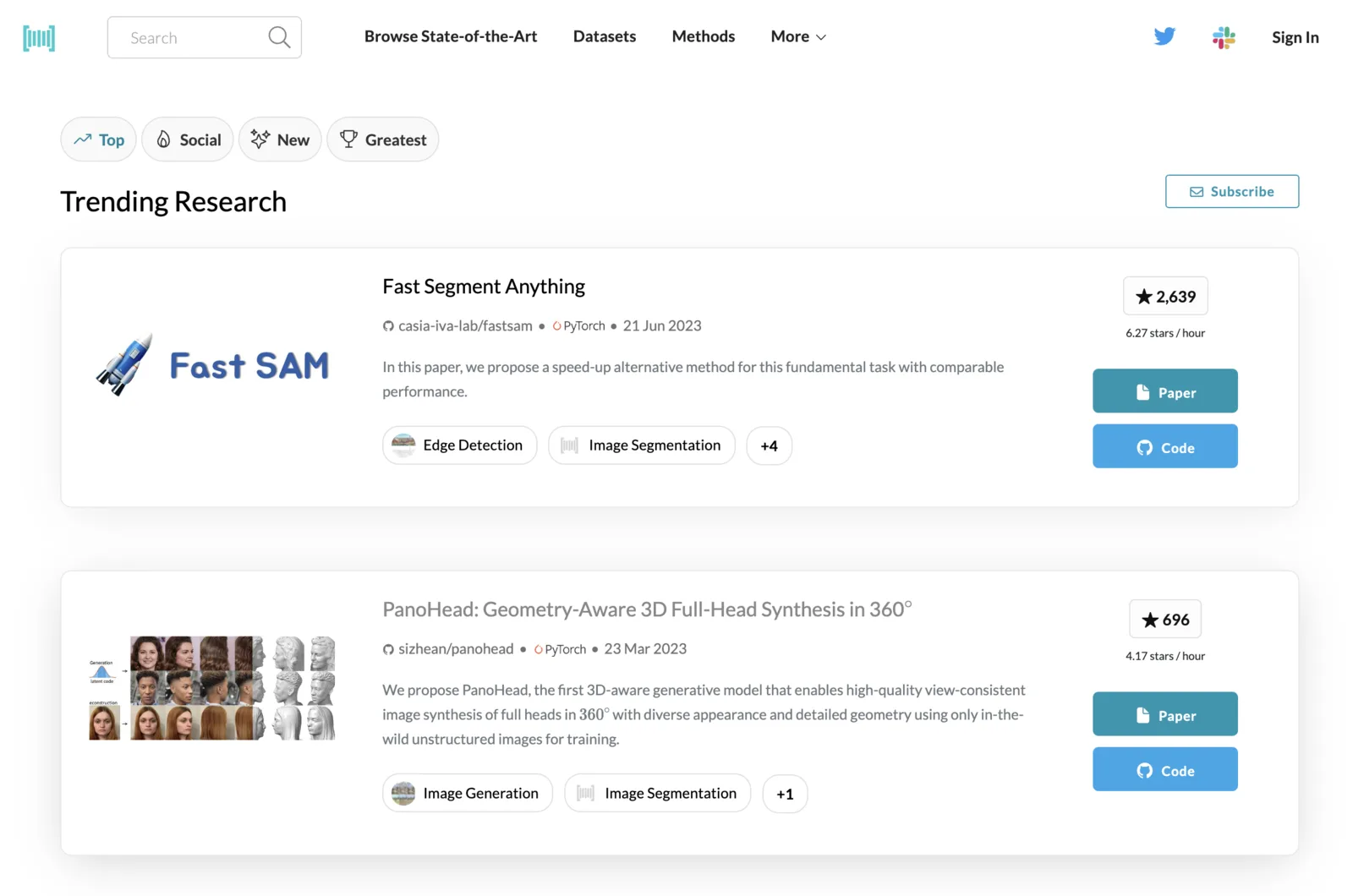
Reproducibility really means being able to recreate a result from all of its ingredients:
- the code (which commit?),
- the data (which version, which split?),
- the environment (which library versions?),
- and the parameters that produced the run.
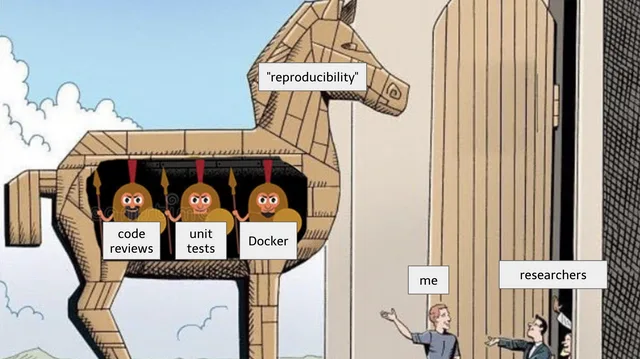
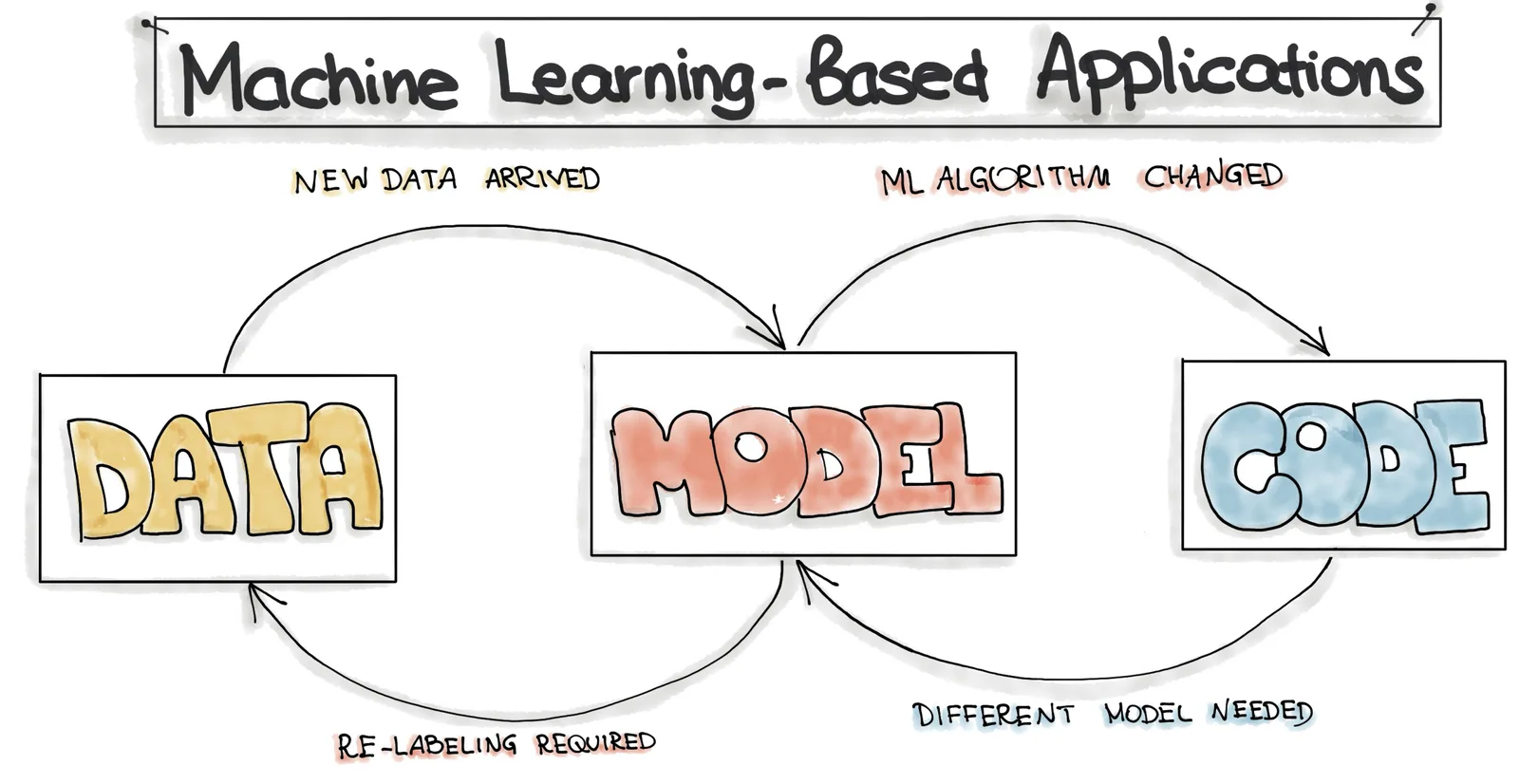
Machine learning makes this harder than ordinary software because three things change over time, not one:
| Artifact | Changes because… |
|---|---|
| Code | the usual reasons: refactors, bug fixes, new features |
| Data | new data arrives, distributions drift, labels get corrected |
| Model | it is retrained, fine-tuned, or replaced |
Track only the code and you will still fail to reproduce a model, because the data and the trained model moved underneath you. MLOps is the practice of bringing software-engineering discipline (automation, reproducibility, monitoring) to all three. The one-line definition worth memorising:
MLOps = DevOps principles applied to machine-learning systems.
To get there, we first need the software-engineering half of that sentence.
The software development cycle
Classic software development moves through repeating stages:
- Development: planning and coding.
- Integration: quick tests and a build.
- Testing: deeper tests, validation, and a release.
- Delivery: final packaging and deployment to a running server.
- Monitoring: collecting data, watching each component, gathering user feedback.
Run those once, by hand, and you have traditional software delivery: slow, batched, and error-prone at the hand-offs.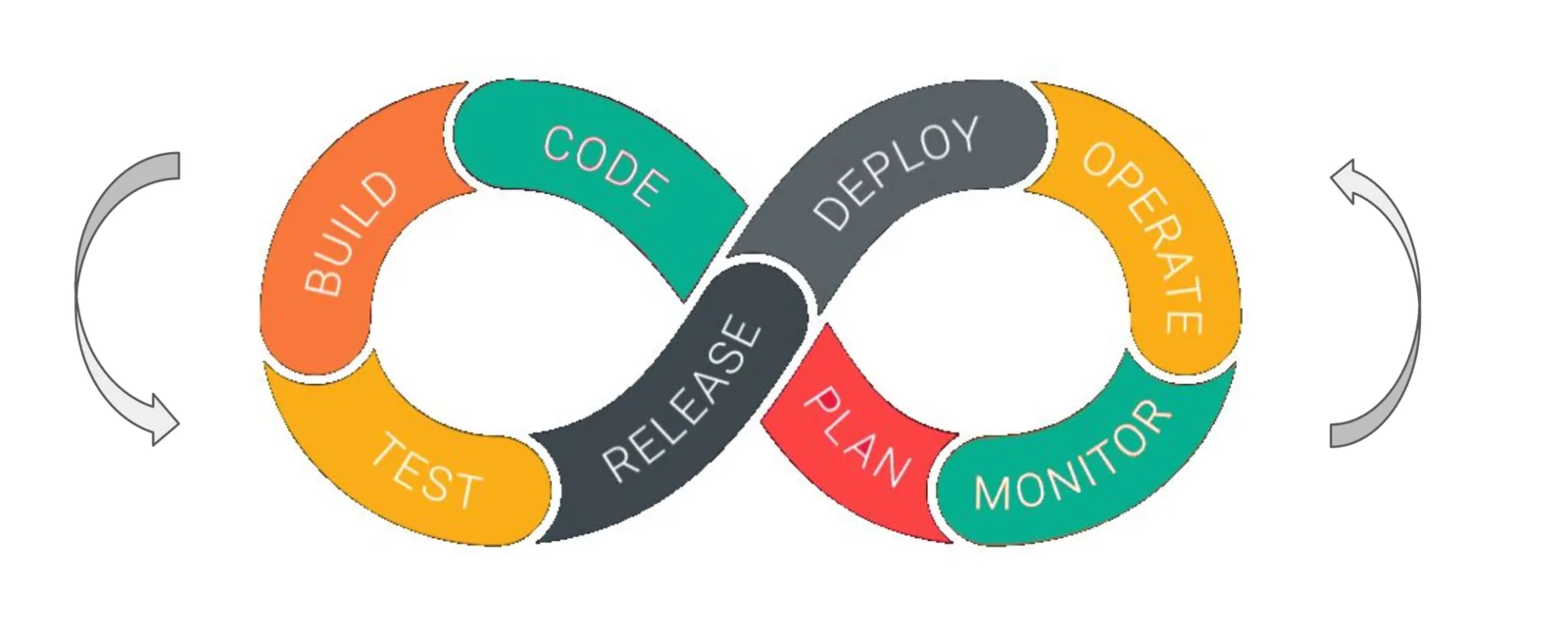
Automating it: DevOps and CI/CD
DevOps is what you get when you automate that cycle so every change flows through it continuously instead of in big manual batches:
- Continuous Integration (CI): every commit is automatically built and tested.
- Continuous Delivery (CD): passing builds are automatically packaged and deployed.
- Continuous Monitoring: the running system is watched for errors and feedback, which flows back into planning.
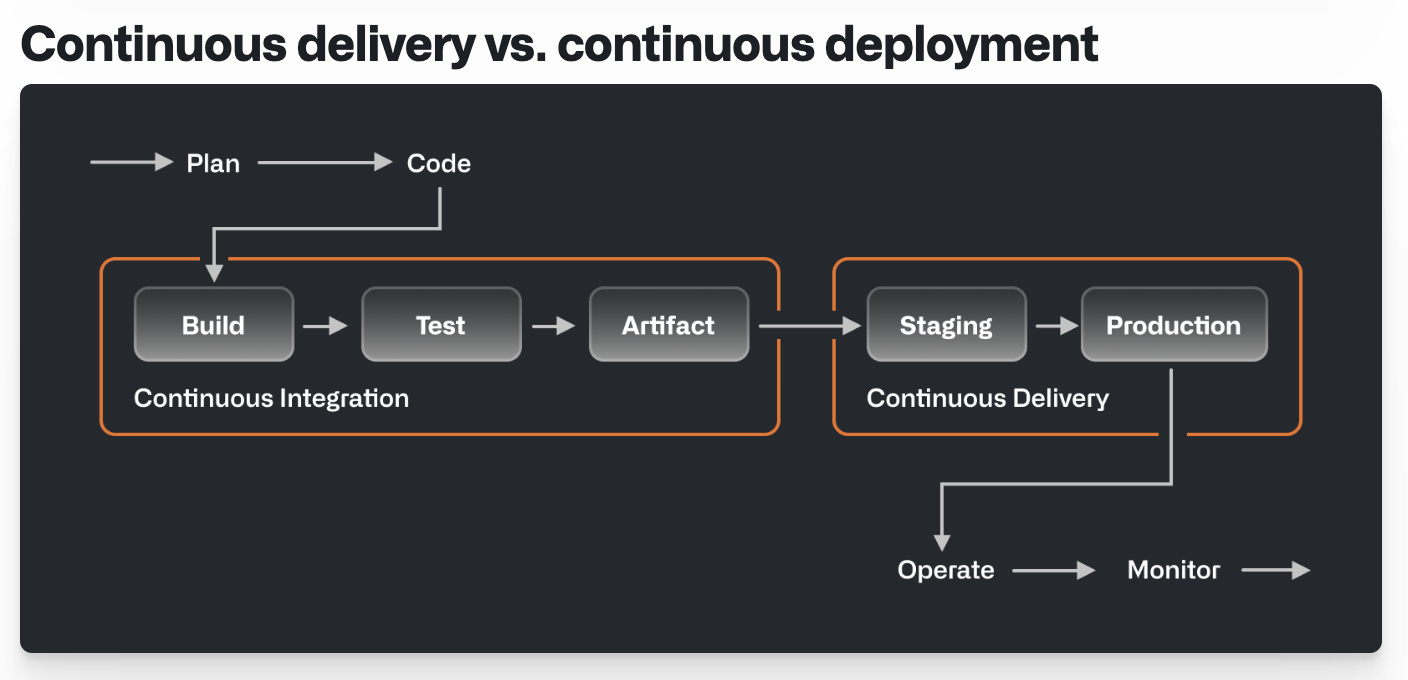
DevOps is usually described as resting on three legs, often drawn as a trident:
- People: a culture where development and operations share ownership.
- Process: the automated CI/CD pipeline itself.
- Tools: the machinery that runs it (GitHub Actions, GitLab CI, containers, and so on).
The tools get the attention, but the culture and the process are what make the automation stick.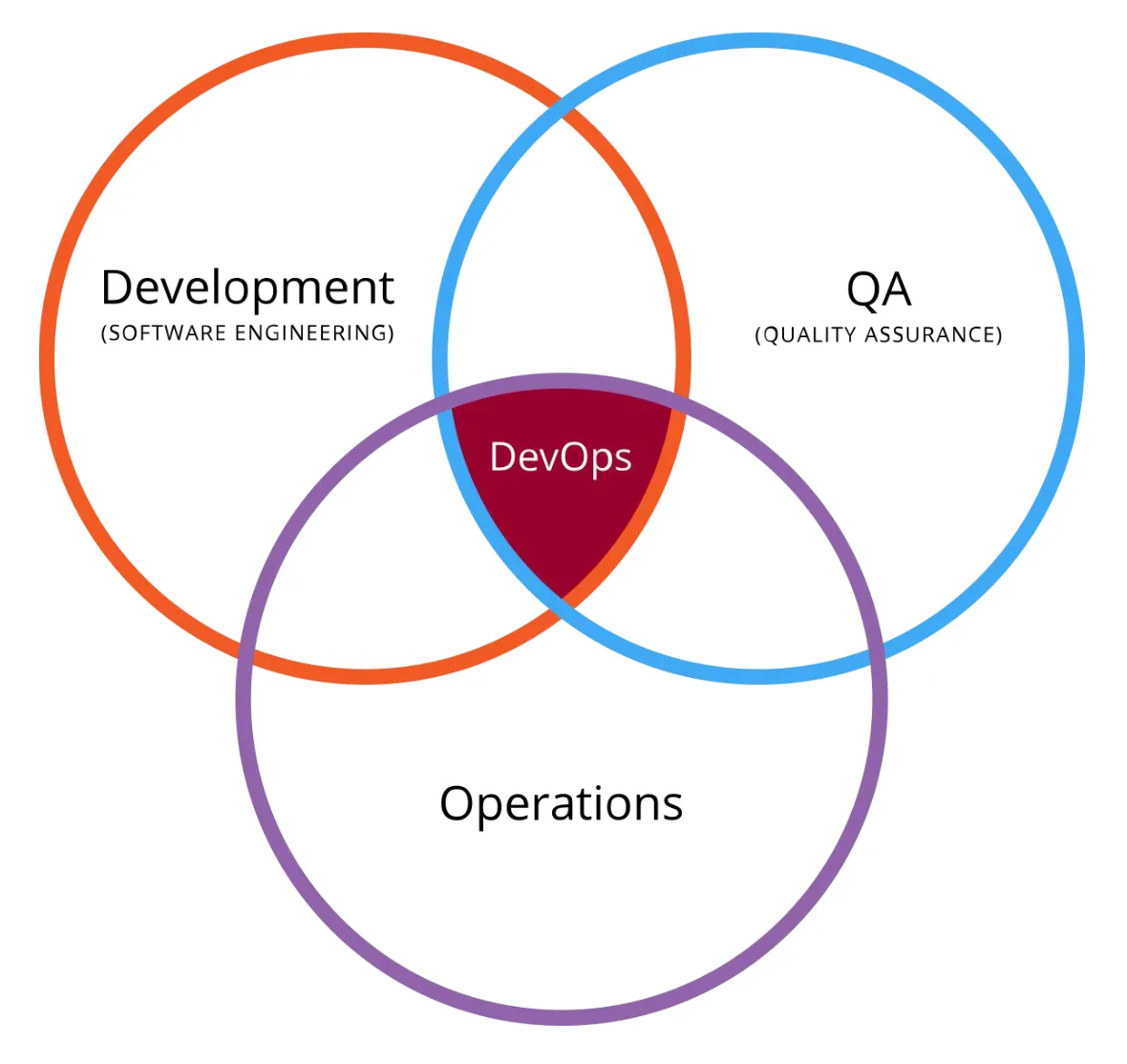
The machine-learning lifecycle
Machine learning adds its own stages on top of the software cycle. A typical ML lifecycle runs:
- Data extraction: fetch the data.
- Data analysis: understand its nature and quirks.
- Data preparation: clean it, engineer features, split into train/validation/test.
- Model training: fit the model, tune hyperparameters.
- Model evaluation: measure quality on held-out data.
- Model validation: confirm it beats a baseline and is fit to deploy.
- Model serving: package and deploy it to make predictions.
- Model monitoring: watch performance and decide when to retrain.
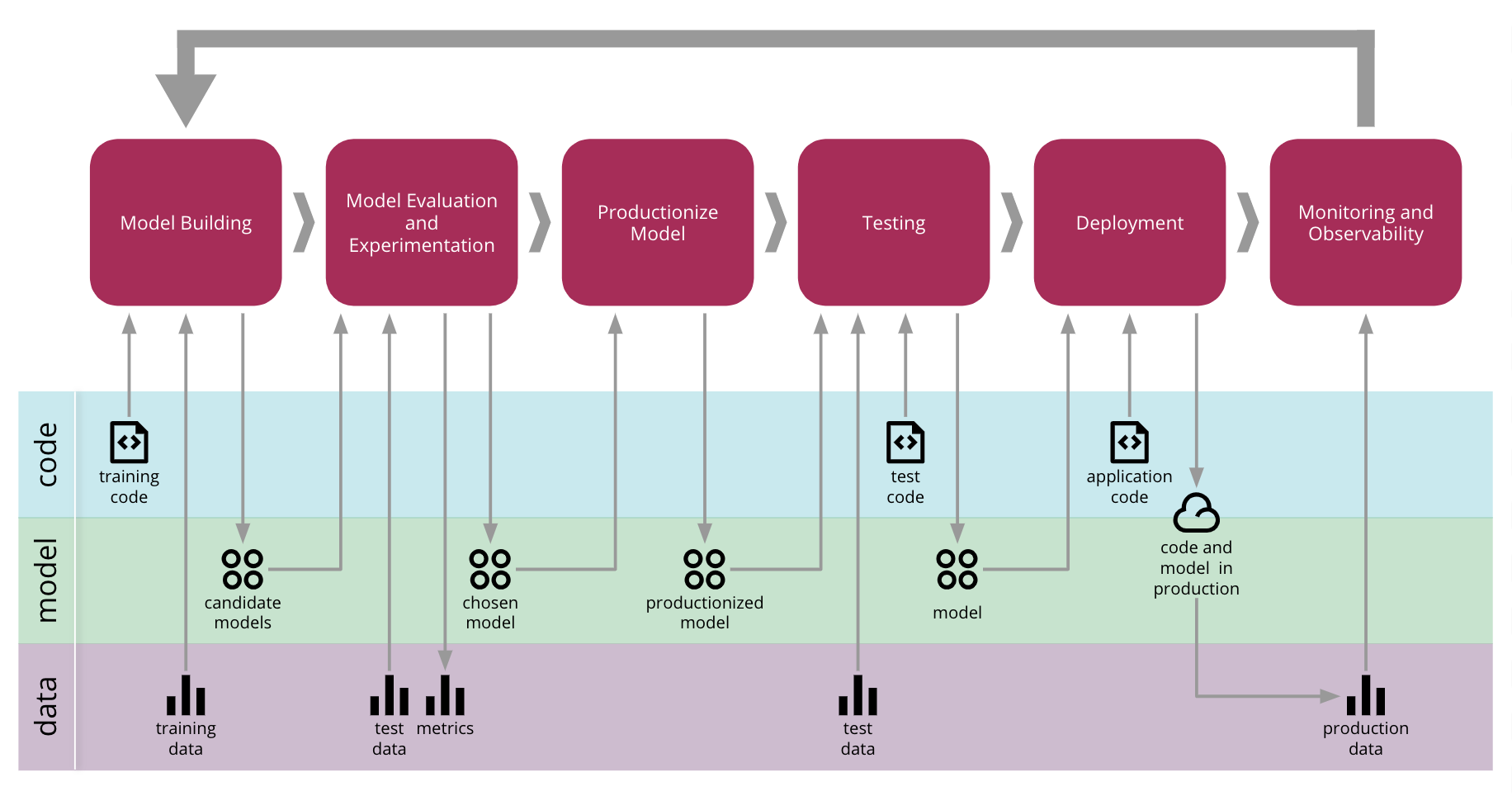
The loop at the end is the important part: monitoring feeds back into data and training. An ML system in production is a living thing, not a shipped artifact.
MLOps = DevOps for ML
Now overlay the DevOps loop onto the ML lifecycle. Each "continuous" practice gains an ML twist: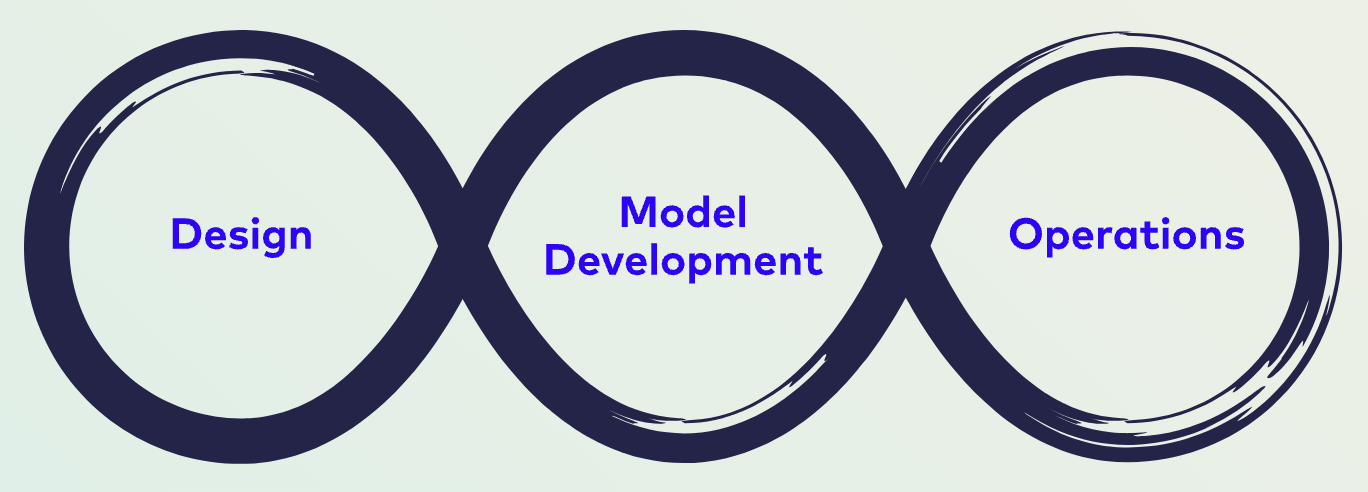
- Continuous Integration is no longer only about testing code: it now also tests and validates data, schemas, and models.
- Continuous Delivery ships not a single package but a whole pipeline that can deploy a model-serving service.
- Continuous Training (CT) is unique to ML: the system can automatically retrain and redeploy as new data arrives.
- Continuous Monitoring tracks model decay and can trigger retraining when quality drops.
CT and model/data monitoring are what make MLOps its own discipline rather than "DevOps with notebooks".
What an MLOps workflow looks like in practice
Put concretely, a working MLOps setup wires together a handful of pieces:
- code versioning (git) and data versioning (DVC): the two moving inputs, tracked like any other asset;
- experimentation in notebooks (Jupyter), feeding an experiment-tracking server (MLflow) that records every run's parameters and metrics;
- artifact tracking (also MLflow): every file a run produces (the trained model, a confusion-matrix plot, a preprocessing pipeline) gets stored and linked to the run that made it;
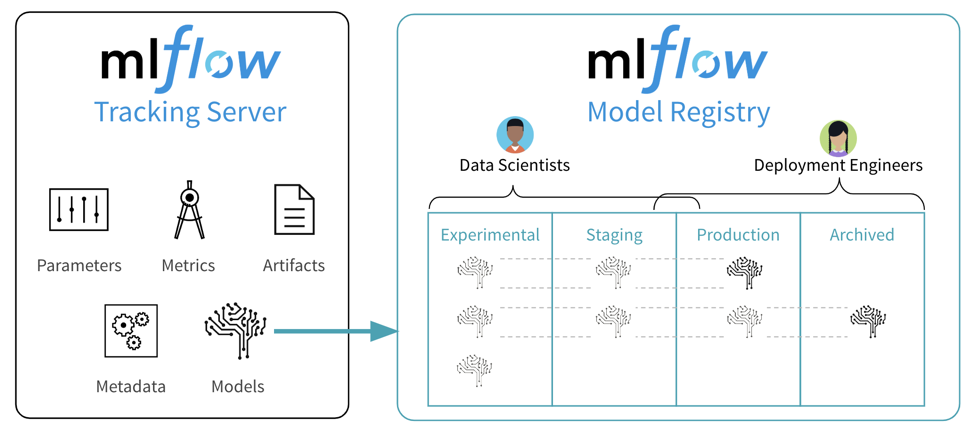
- a model registry (MLflow) that versions the best models and stages them (staging → production);
- pipeline orchestration (Airflow) that wires the above into a scheduled, repeatable flow;
- model serving (BentoML) that wraps a registered model in an API; and
- model monitoring (Prometheus/Grafana) that watches the served model and closes the loop back to data.
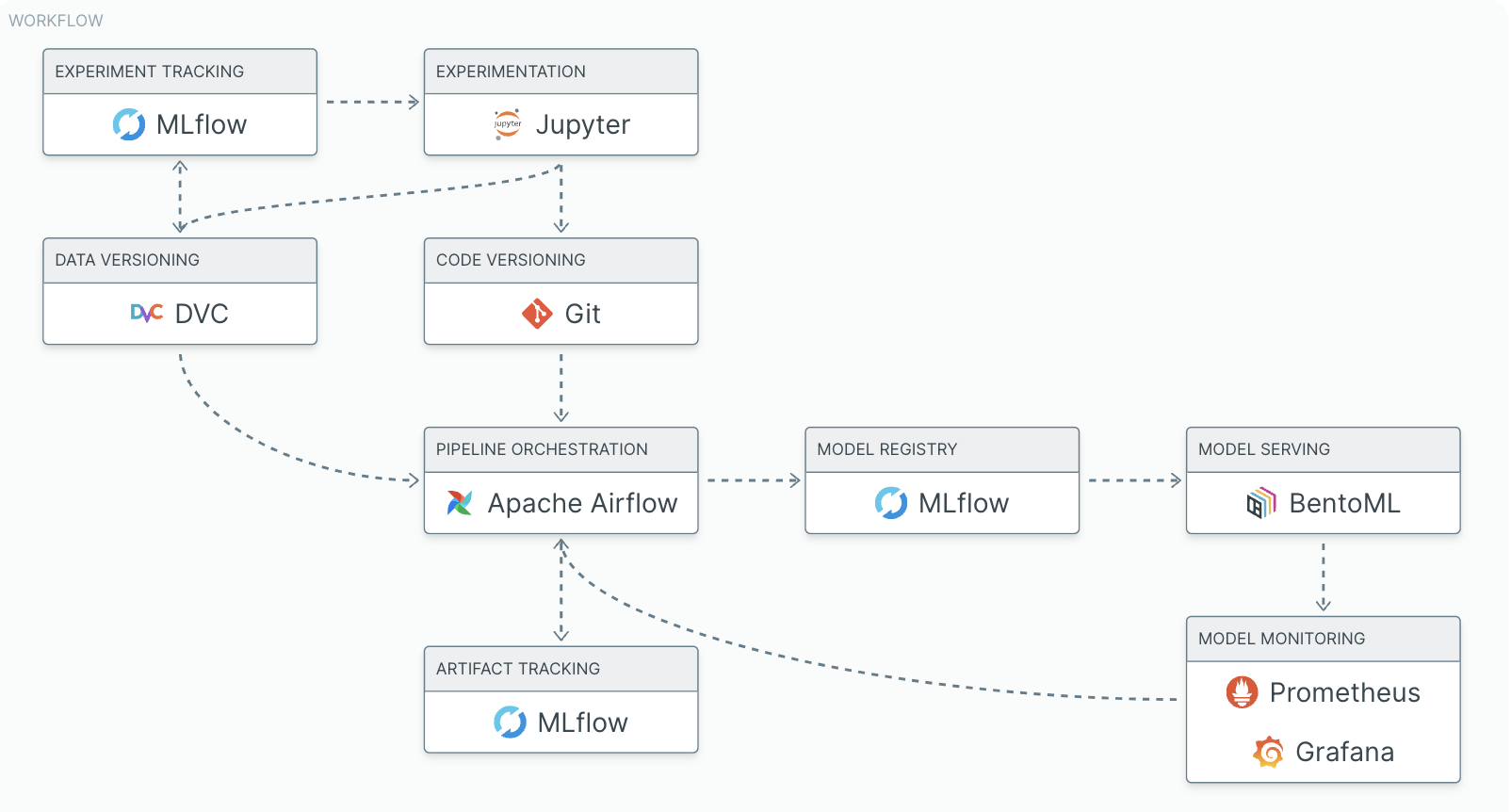
Experiment tracking and artifact tracking are easy to conflate; MLflow happens to do both, which is why it appears three times in the diagram. The distinction matters: experiment tracking logs the numbers (mlflow.log_metric("accuracy", acc)), while artifact tracking stores the files a run produced (mlflow.log_artifact("confusion_matrix.png")). Same tool, two different jobs. You will use both in the hands-on below.
You do not build all of this on day one. The habit that pays off fastest, even in a solo project, is experiment tracking. We will work through that first, then connect it to model serving.
MLflow: the tool we will use
MLflow is the open-source standard for experiment tracking. The mental model: an ML experiment is environment + data + code, and MLflow is the logbook that records, for each run, its hyperparameters + results + plots so you can compare runs later in a web UI. It is framework-agnostic (scikit-learn, PyTorch, TensorFlow, XGBoost…) and works for any computational experiment, not just ML.
MLflow has four components: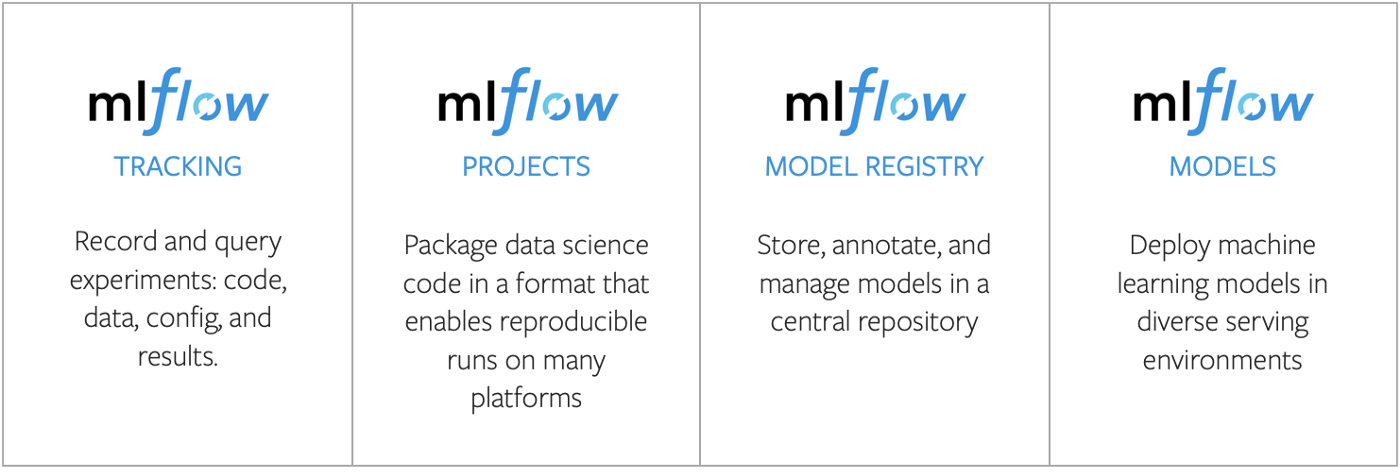
- Tracking: log parameters, metrics, and artifacts per run (our focus).
- Projects: package code so a run is reproducible.
- Models: a standard packaging format so a trained model can be served anywhere.
- Model Registry: version models and move them through stages (staging → production).
The MLflow tracking API
Tracking comes down to a few calls. First, name an experiment to group related runs, then wrap each run in a context manager:
import mlflow

mlflow.set_experiment("intro-to-mlops")

with mlflow.start_run(run_name="my-first-run"):
    mlflow.log_param("learning_rate", 0.01)       # one hyperparameter
    mlflow.log_params({"epochs": 20, "batch": 32}) # several at once
    mlflow.log_metric("accuracy", 0.92)            # a result
    mlflow.sklearn.log_model(model, name="model")  # the model itself
The three verbs you will use constantly:
log_param/log_params: key-value settings (hyperparameters, config).log_metric: numeric results (loss, accuracy); these become plots in the UI so you can compare runs.log_model: the trained model, in MLflow's portable format.
Too lazy to log by hand? For supported libraries, a single autolog() call before fit() captures parameters, metrics, and the model automatically:
mlflow.sklearn.autolog()      # or mlflow.tensorflow.autolog(), mlflow.pytorch.autolog()
model.fit(X_train, y_train)   # params, metrics, and model are logged for you
Manual logging gives you the most control; autolog gives you most of the value for one line. And the feature people quietly love most: logging plots as artifacts, so a figure is stored with the run and viewable in the UI:
plt.savefig("loss.png")
mlflow.log_artifact("loss.png")
Where MLflow stores runs: three setup options
Before logging anything, MLflow needs to know where runs go. There are three options, in increasing order of scale: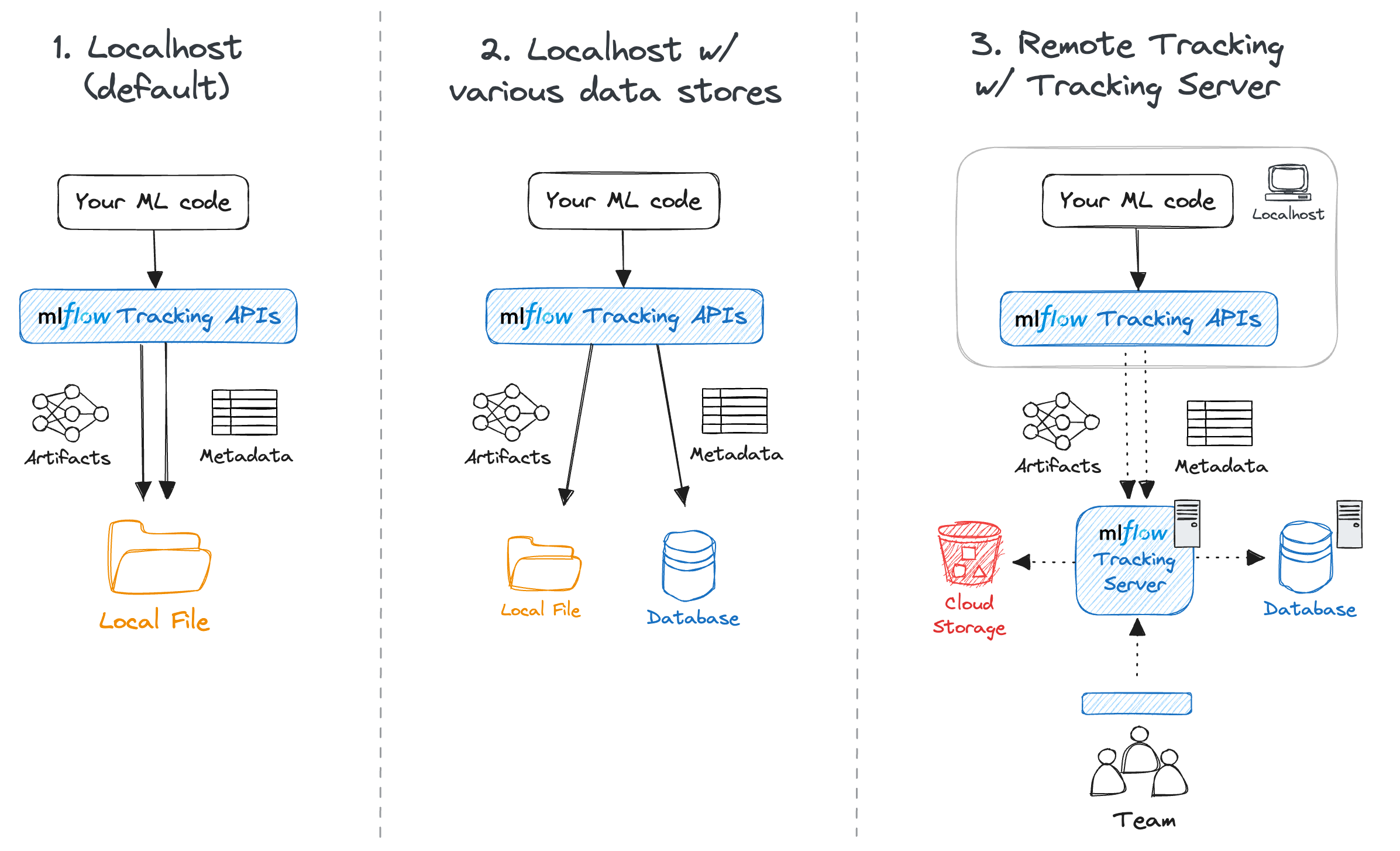
- Option 1, local filesystem (
./mlruns): the simplest default. - Option 2, local database (
sqlite:///mlflow.db): still on your laptop, but the backend MLflow now recommends. This is what we use below. - Option 3, remote server (
http://server:5000): a shared tracking server for a team.
Hands-on: track your first experiment
Everything below is self-contained and runs on a laptop in under ten minutes. We will train two small classifiers, log them to MLflow, and compare them in the UI.
Prerequisites: Python 3.9+ and pip. No GPU, no cloud account, no prior MLflow setup. Five steps: install → write the script → run it → run it again → open the UI.
Want to just clone and run? The full source (script and notebook) lives in the companion repo: github.com/JienWeng/mlops-tutorial.
git cloneit,pip install -r requirements.txt, thenpython train.py(or opennotebook.ipynb). The steps below explain what that code does.
1. Install
python -m pip install mlflow scikit-learn matplotlib2. Choose a store (Option 2: local SQLite)
We use a local SQLite database, Option 2 above. It keeps everything on your laptop with no server to run.
Heads-up (MLflow 3.x): the plain-folder store (
./mlrunson its own) is now in maintenance mode and will raise an error unless you opt in. A SQLite URI likesqlite:///mlflow.dbis the friction-free local setup, so that is what we use. (On MLflow 2.x this same code still works.)
We set the store directly in the script, so there is nothing to configure separately.
3. The experiment script
Save this as train.py. It trains a logistic-regression classifier on the classic breast-cancer dataset, then logs the parameters, the metrics, the trained model, and a confusion-matrix plot.
# train.py
import matplotlib.pyplot as plt
import mlflow
import mlflow.sklearn
from sklearn.datasets import load_breast_cancer
from sklearn.linear_model import LogisticRegression
from sklearn.metrics import ConfusionMatrixDisplay, accuracy_score, f1_score
from sklearn.model_selection import train_test_split

# Where to store runs: a local SQLite db (metadata) + ./mlruns (artifacts)
mlflow.set_tracking_uri("sqlite:///mlflow.db")
# Group related runs under a named experiment
mlflow.set_experiment("intro-to-mlops")

# --- data ---
X, y = load_breast_cancer(return_X_y=True)
X_train, X_test, y_train, y_test = train_test_split(
    X, y, test_size=0.2, random_state=42
)

# A hyperparameter we want to track and vary later
C = 1.0  # inverse regularisation strength

with mlflow.start_run(run_name=f"logreg-C={C}"):
    # --- train ---
    model = LogisticRegression(C=C, max_iter=10_000)
    model.fit(X_train, y_train)

    # --- evaluate ---
    preds = model.predict(X_test)
    acc = accuracy_score(y_test, preds)
    f1 = f1_score(y_test, preds)

    # --- log: parameters, metrics, the model itself ---
    mlflow.log_param("model", "LogisticRegression")
    mlflow.log_param("C", C)
    mlflow.log_metric("accuracy", acc)
    mlflow.log_metric("f1", f1)
    mlflow.sklearn.log_model(model, name="model")

    # --- log: a plot as an artifact ---
    ConfusionMatrixDisplay.from_predictions(y_test, preds)
    plt.title(f"Confusion matrix (C={C})")
    plt.savefig("confusion_matrix.png", bbox_inches="tight")
    mlflow.log_artifact("confusion_matrix.png")

    print(f"Logged run: accuracy={acc:.4f}, f1={f1:.4f}")
Run it:
python train.pyYou just produced your first tracked run. The parameters, metrics, the serialised model, and the plot are all saved.
4. Make a second run to compare against
Change one line, C = 0.01, and run python train.py again. (Stronger regularisation; the score should move.) Now you have two runs to compare, which is the whole point of tracking.
5. Inspect and compare in the UI
From the same folder, start the UI, pointing it at the same SQLite store:
mlflow ui --backend-store-uri sqlite:///mlflow.dbOpen http://127.0.0.1:5000. You will see the intro-to-mlops experiment with both runs. It looks like this: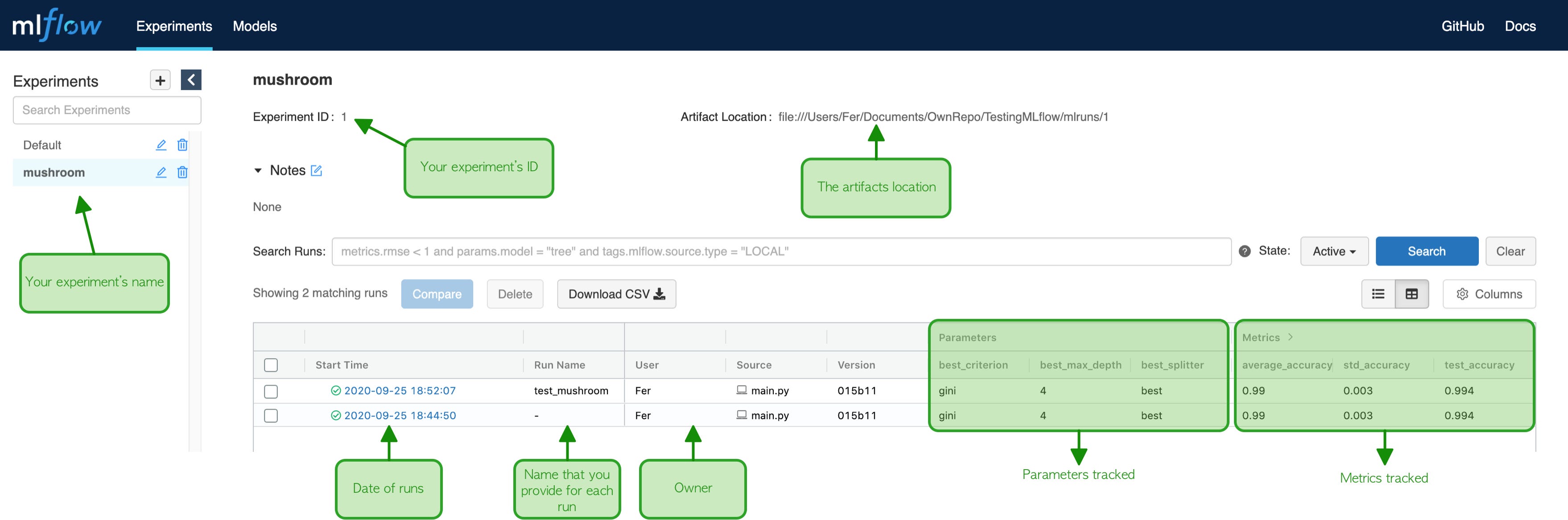
From here you can:
- sort and filter runs by
accuracyorf1, - tick two runs and click Compare to see parameters and metrics side by side,
- open a run to view its confusion-matrix plot and download the saved model.
That comparison view answers the question MLOps exists to answer: which settings gave the best score, and exactly how were they produced? You now have a reproducible record of it.
6. Serve it: MLflow → BentoML (minimal)
Tracking answers "what's the best run?" Serving answers "how do users call it?" This is the model serving box from the workflow diagram above, and BentoML is the tool. The bridge is one call: load the model MLflow already tracked and stored, hand it to a Bento service.
python -m pip install bentomlSave this as service.py, next to mlflow.db and mlruns/ (also in the companion repo, alongside train.py):
# service.py
import bentoml
import mlflow

mlflow.set_tracking_uri("sqlite:///mlflow.db")

# Grab the most recent run of the experiment, no run ID to copy by hand
experiment = mlflow.get_experiment_by_name("intro-to-mlops")
latest_run = mlflow.search_runs(
    experiment.experiment_id, order_by=["start_time DESC"], max_results=1
).iloc[0]
model = mlflow.sklearn.load_model(f"runs:/{latest_run.run_id}/model")

@bentoml.service
class MLopsService:
    @bentoml.api
    def predict(self, features: list[list[float]]) -> list[int]:
        return model.predict(features).tolist()
Run it:
bentoml serve service:MLopsServiceThat starts an HTTP API on http://127.0.0.1:3000 with interactive docs. Call it:
curl -X POST http://127.0.0.1:3000/predict \
  -H "Content-Type: application/json" \
  -d '{"features": [[14.0, 20.0, 90.0, 600.0, 0.1, 0.1, 0.1, 0.05, 0.2, 0.06, 0.4, 1.0, 3.0, 40.0, 0.006, 0.02, 0.03, 0.01, 0.02, 0.003, 16.0, 25.0, 105.0, 900.0, 0.14, 0.25, 0.3, 0.12, 0.3, 0.08]]}'
That's the whole bridge: MLflow tracks and stores the model; BentoML loads it by URI and serves it. Everything past this (batching, Docker packaging with bentoml build, autoscaling) is the same idea scaled up.
What you just built (and what comes next)
You have implemented the smallest real MLOps loop: parameterise → run → log → compare → serve. The natural extensions, in rough order of payoff:
- Commit
train.pyto git so each run is tied to a code version. - Register the best model in MLflow's Model Registry to give it a name and version, instead of pasting a run ID.
- Automate the run in CI so a push retrains and re-logs.
- Monitor the served model's predictions, closing the loop back to data.
That list is exactly the MLOps workflow from earlier. You have now built its first two links.
Take-home message
Research, and production work too, should be reproducible and, where possible, open. If your work involves machine learning, that means using dedicated tools to make experiments reproducible rather than relying on memory and scattered notebooks.
Adopting these habits in your daily workflow pays off quickly: time saved in the long run, engineering skill gained, and trust earned among collaborators. And MLflow in particular is not just for machine learning: it is a capable logbook for tracking any computational experiment and keeping your results reproducible over time.
Source and licence. This tutorial follows and adapts the lecture “An introduction to MLOps” by Alexandre Boucaud (LSST France, Lyon, December 2023), licensed under CC BY-SA 4.0. The figures come from the accompanying slides, re-hosted under the same licence; individual captions credit their original sources. This tutorial and hands-on example are my own adaptation and are also shared under CC BY-SA 4.0.